Moving to reject without blocking your own email
12 min read
Everyone tells you to move to p=reject. Nobody tells you how to get there without breaking your own flows, and that is why so many domains stay stuck in monitoring for years.
This article is about that transition. It incorporates the revision of the standard published in May 2026, which changes some of the advice you will find elsewhere.
What you are actually risking
Let us start with the risk, because it is poorly understood. Tightening too fast does not cause a visible outage. That is precisely the problem.
Your servers keep sending, your tools report no errors, your team notices nothing. It is simply that some of your messages stop arriving. The invoices your accounting software sends are refused at the door. Your website's order confirmations disappear. E-signature requests reach nobody.
The average delay before somebody makes the connection is measured in weeks. The trigger is almost always a customer calling to say they never received their invoice, and the investigation rarely gets back to the DNS on the first try.
That is why caution here is not timidity.
The three policies, and what they actually do
The p tag in your DMARC record takes three values.
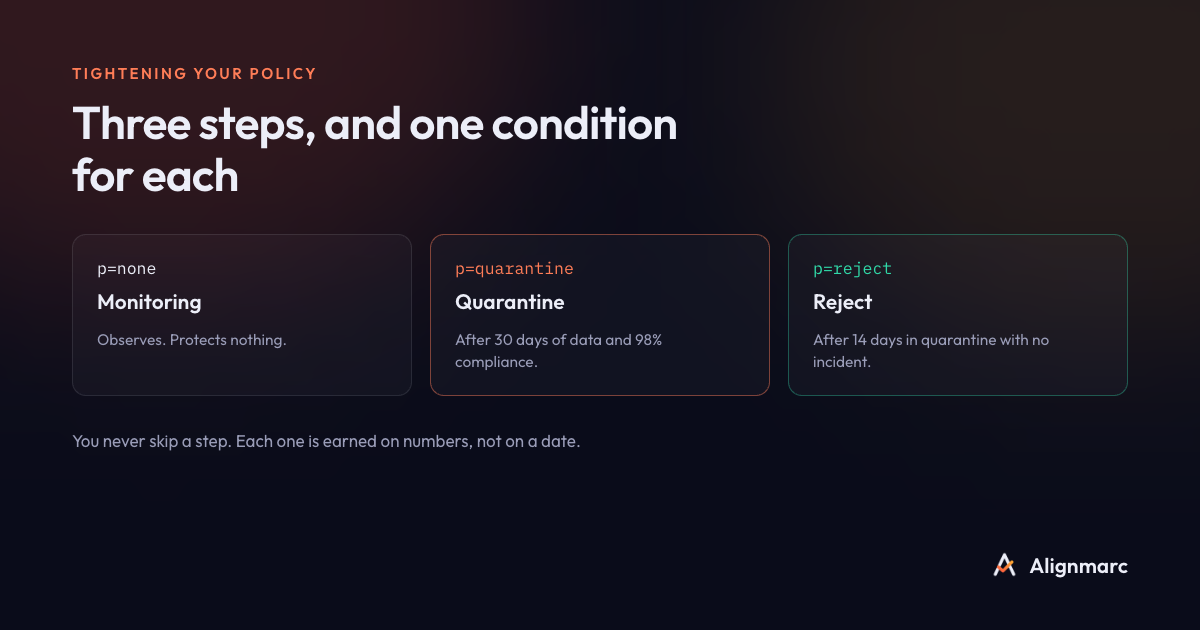
p=none, monitoring. You ask receivers to change nothing about their handling and to send you reports. No effect on your messages. It is the mandatory starting point, and its only purpose is to produce data.
p=quarantine. You ask receivers to treat non-compliant messages as suspicious. In practice, most of them file them as spam. The message is not lost, it is demoted. This is a genuine intermediate step, less brutal than rejection.
p=reject. You ask receivers to refuse non-compliant messages during the SMTP transaction. The sender gets an error, the recipient sees nothing. This is the goal, because it is the only policy that actually protects your customers against spoofing.
One thing worth knowing: receivers are never obliged to obey you. Some apply rules of their own, particularly on forwarded messages. So you will sometimes see, in your reports, non-compliant messages that were not rejected despite your policy.
The pct tag has been removed, and that matters
If you have read guides on rolling DMARC out gradually, you know the pct tag. It applied your policy to a percentage of messages only: pct=10 with p=reject meant “reject 10% of non-compliant messages, let the rest through”. The idea was to tighten in increments.
That tag no longer exists. The revision of the standard, published in May 2026 as three documents (RFC 9989 for the protocol, 9990 for aggregate reports and 9991 for failure reports), moved it to historic status. Those texts replace RFC 7489, which had governed DMARC since 2015.
The reason for the removal is simple: the mechanism did not work. Receivers applied it inconsistently, and the same pct=50 produced different behavior from one operator to the next. The gradual rollout it promised was an illusion of control.
In its place, the standard introduces a t tag for test mode. It is binary: t=y asks the receiver to lower the enforcement of your policy by one notch. A p=reject with t=y is treated as a quarantine, a p=quarantine as monitoring.
The mapping to the old usage is direct. A pct=0 becomes t=y. A pct=100 is written by simply omitting the tag. And the intermediate values, between 1 and 99, no longer have an equivalent.
It needs saying plainly: the new standard removes a broken mechanism without replacing it with a working one. Test mode lowers by one notch, it does not sample. There is no longer any standardized way to tighten a DMARC policy gradually. Progress therefore happens in whole steps, and that is exactly what makes the preparation beforehand more important than it used to be.
What if your record still contains a pct? Nothing urgent: its presence causes no error and your record stays valid. But it will be increasingly ignored as receivers adopt the new text. So stop relying on it, and remove it at your next edit.
Two other useful additions
The standard also adds an np tag, which defines the policy for non-existent subdomains. This is real protection: fraudsters happily use subdomains that never existed, such as billing.yourcompany.com, precisely because they escaped badly configured policies. An np=reject closes that door, and it is risk-free since, by definition, no legitimate flow leaves from a subdomain that does not exist.
The calculation of the organizational domain also changes method, which affects the alignment of your subdomains. That subject is covered in our article on alignment.
The four conditions to meet before moving
Do not tighten until these four conditions are met at the same time.
Enough history. Two weeks of data at minimum, four to eight preferably. Duration matters less than coverage: you need to have seen your occasional senders go by.
A high, stable compliance rate. Above 95% to move to quarantine, above 99% to move to reject. The important word is stable: a rate that swings signals an intermittent sender you have not identified yet.
No unrecognized sender above the background noise. As long as a source with meaningful volume has no name, you cannot know whether blocking it is desirable or catastrophic.
All your approved senders are aligned. Not merely authenticated: aligned. That distinction makes all the difference, and it is read from the right field in your reports.
The cases that break in practice
Six situations come up systematically. Check them by name before you move.
Invoices and automated documents. Your accounting software often sends from its own server with your address. This is the flow that breaks most often, and the most expensive one.
Website forms. Many sites send confirmations from the hosting server, with an address on your domain and no authentication at all.
Automatic forwarding. An employee forwarding their mailbox to a personal address breaks SPF every time. Only DKIM survives.
Mailing lists. They often modify the message, which invalidates the DKIM signature. Well-run lists rewrite the sender; others do not.
Invisible providers. E-signature, scheduling, recruiting, satisfaction surveys. They write in your name and appear in no inventory.
Hardware. Copiers emailing scanned documents, alarm systems, monitoring. They use an address on your domain and have no authentication.
A ninety-day rollout plan
Days 1 to 14, observe. Publish p=none with a reporting address. Change nothing else. Collect.

Days 15 to 30, name. Translate each source into a provider name. Sort them into legitimate and approved, legitimate but needing a fix, or to be eliminated. This is the longest step, and the one that determines everything else.
Days 31 to 60, fix. Have every legitimate sender sign with DKIM using your domain. Allow one to three weeks per provider, the delay coming from their support desk, not from the technology. Cut off abandoned tools.
Days 61 to 75, quarantine. When the rate is stably above 95%, move to p=quarantine. Watch the daily volume: a marked drop signals a broken flow. Stay there two weeks.
Days 76 to 90, reject. Above 99% and with no unknown sender, move to p=reject. Add np=reject right after. Keep reading your reports: a new tool plugged in by a department six months from now will start out unaligned.
This calendar assumes you make steady progress. In real life, the days 31 to 60 step almost always overruns, because a provider's support desk takes three weeks to reply. That is fine. What matters is not tightening until the four conditions are met.
The signals that should make you back off
Three signals call for a return to the previous step, without hesitation.
A drop in the total volume reported from one day to the next. It is not your sending going down, it is a flow that has stopped arriving.
The appearance of an unrecognized sender with volume, right after a tightening. You have probably just blocked a legitimate tool.
A customer call about a message never received. Go back to monitoring while you work out what happened. A DNS record takes five minutes to change.
Backing off is not a failure. Tightening and then reverting is vastly cheaper than spending three weeks blocking your own invoices.
Frequently asked questions
Does the pct tag still exist in DMARC?
No. The revision published in May 2026 as RFC 9989, 9990 and 9991 moved it to historic status. It is replaced by a t test-mode tag, which lowers the policy by one notch instead of sampling.
How long should I stay in monitoring before tightening? Two weeks of usable data at minimum, four to eight most of the time. Stability matters more than duration.
What happens if I move to reject too early? Your unaligned messages are refused. Your invoices and confirmations stop arriving, generally without anyone making the connection for several weeks.
Should I go through quarantine or straight to reject?
Go through quarantine. It is the only intermediate step left since pct was removed, and it lets you see the effects of tightening without losing messages for good.
My record still contains pct: do I need to remove it urgently? No. It causes no error, but it will be increasingly ignored. Remove it at your next edit and stop relying on it.
Alignmarc computes the four conditions continuously and tells you what is still stopping you from tightening, naming each blocker. The first domain is free.
Read next