Who sends email on your behalf?
8 min read
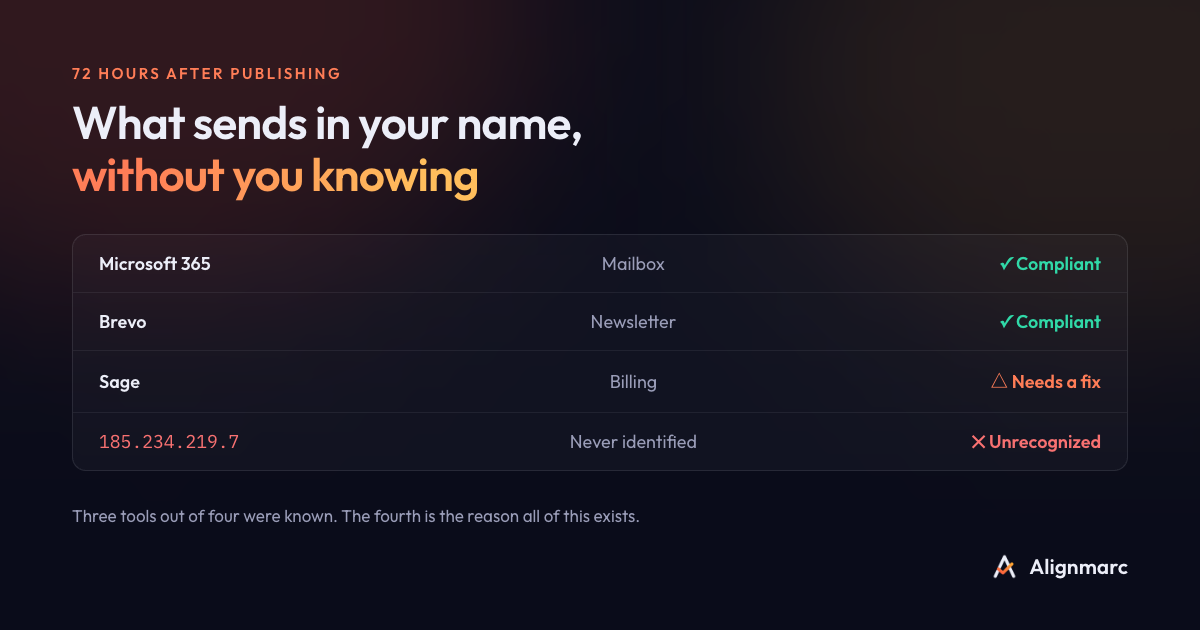
Ask an executive: which tools send email in your company's name? They will answer “our mail system”, pause, then add “and the newsletter, I think”.
The right answer is usually somewhere around twelve.
The question sounds harmless. It is in fact the prerequisite to any serious protection against spoofing, and it is also the one almost no company can answer.
The list nobody keeps
Here is what writes in your name at an ordinary small company.
Your mail system, Microsoft 365 or Google Workspace, the one everybody thinks of.
Your invoicing tool, which sends quotes and invoices from your accounting address.
Your CRM, which sends sales follow-ups from your reps' addresses.
Your email marketing platform, for the newsletter and campaigns.
Your website, for contact forms and order confirmations.
Your support desk, which answers tickets.
Your payroll or HR software, which distributes payslips.
Your e-signature service, which sends signature requests.
Your scheduling tool, which confirms and reminds.
Your backup or monitoring system, which alerts the administrator.
The copier down the hall, which emails scanned documents.
And finally the provider nobody remembers any more, still sending a quarterly campaign from a platform configured three years ago by someone who has since left.
Twelve entries, and only three come to mind naturally.
Why that list exists nowhere
There is neither negligence nor disorganization in this. The list does not exist because nobody was ever put in charge of keeping it.
Each tool was chosen by the department that needed it. Marketing picked its email platform, accounting its invoicing software, sales its CRM. Each of them conscientiously followed the provider's setup procedure, which invariably ends with “add this line to your DNS”. Somebody added it. Nobody kept the register.
IT has no visibility on those choices, because they never went through IT. This is what people call shadow IT, and email is its densest ground: unlike software, plugging in a new sender requires no installation, no workstation and no IT budget. A credit card and five minutes are enough.
The result is a strange situation. A dozen systems hold the right to speak in your company's name, and the company does not know which ones.
Why it becomes a problem now
As long as nobody was trying to tighten their setup, the ignorance had no consequences.
Two things have changed.
The major mail operators have tightened their requirements for bulk senders. What used to be good practice has become a condition of delivery.
And spoofing has industrialized. A falsified invoice sent from your domain name to your own customers costs almost nothing to produce, and the reputational damage lands entirely on you.
The protection exists, it is called DMARC, and it consists of asking receivers to reject any message that is not authenticated in your name.
That is where it stalls. Asking for rejection without knowing your senders amounts to blocking your own invoices. You cannot protect a domain whose legitimate senders you do not know. That is why so many companies publish a DMARC record in monitoring mode and never touch it again: they know the next step is risky, and they have no way to measure the risk.
Rebuilding the list, with nothing to install
The good news is that the information already exists and costs you nothing to obtain.
Every mail operator that receives your email knows exactly which IP addresses claim to write in your name. It is even willing to tell you, every day, for free. It is only waiting for you to say where to send the report.
That is what a DMARC record in monitoring mode is for. You publish one line in your DNS, just one, which says, in substance: “block nothing, but tell me what you see”. Twenty-four to forty-eight hours later, the reports start arriving.
Two reassuring points, because the worry comes up often.
A monitoring policy blocks nothing and sorts nothing. It asks receivers to take no action on your messages. It has no effect on your deliverability.
It is reversible in minutes. It is a DNS record, which you delete the way you created it.
After two weeks, you have the list. That is generally the moment something turns up: the tool a former employee had plugged in, the provider still active after the contract ended, or an IP address abroad that nothing accounts for.
The provider sending in your name without knowing it
One case deserves a separate word, because it surprises even experienced administrators.
Plenty of providers send in your name without being aware of it, and without you being aware of it either. Your scheduling tool sends confirmations with your address as the sender. So does your e-signature service. Your recruiting platform writes to candidates in your name.
Those flows are perfectly legitimate. They are simply invisible, because they leave from servers you do not own and that appear nowhere in your infrastructure.
They are the first to break when a company tightens its policy without taking inventory first. And because they are invisible, nobody makes the connection: you simply notice that candidates stopped receiving anything, three weeks later.
What to do with each sender once identified
Once the list is drawn up, each entry calls for a decision, and there are only three.
Legitimate and authenticated. Nothing to do; mark it approved.
Legitimate but not authenticated. This is the most common case. You need to ask the provider to sign with your domain, which usually takes the form of two or three records to publish in your DNS. Every serious provider documents the procedure. The mechanism at work is explained in our article on alignment.
Not legitimate. Either it is an abandoned tool, and you cut it off at the source. Or it is spoofing, and your future reject policy will take care of it.
The hard part is not the decision, it is the identification. A DMARC report gives you IP addresses, not names. Knowing that 54.240.27.118 sent 312 messages gets you nowhere. Knowing it is your CRM changes everything.
That is precisely the difference between the raw XML file and a readable inventory.
Frequently asked questions
How do I find out which tools send email using my domain name? By publishing a DMARC record in monitoring mode. Mail operators then send you, every day, the list of IP addresses writing in your name, with nothing to install on your side.
Is it risky to publish a DMARC record in monitoring mode? No. A monitoring policy asks receivers to block nothing and sort nothing, only to report back. It has no effect on your deliverability and is reversible in minutes.
How many senders does a small company have on average? Between five and twenty, counting mailboxes, CRM, invoicing, marketing tools, support, the website and outside providers. Most executives name two or three off the top of their head.
How long does it take to get the list? The first reports arrive within twenty-four to forty-eight hours. Allow two weeks for a reliable picture, so that occasional senders have time to show themselves.
What should I do if I find a sender nobody recognizes? Do not cut anything off before you have looked into it. An unrecognized sender is more often a forgotten tool than an attack, and cutting it off on a hunch means breaking a legitimate flow.
Do I need a tool for this inventory? Not necessarily, but you do need to translate IP addresses into provider names, which no report does for you. It is doable by hand on one domain, and laborious beyond that.
Alignmarc rebuilds that inventory for you and names every sender instead of showing IP addresses. The first domain is free.
Read next