Reading a DMARC aggregate report, line by line
11 min read

You published your DMARC record. Two days later, your inbox receives a compressed file sent by noreply-dmarc-support@google.com. You unzip it and find several hundred lines of XML.
This article decodes a complete report, skipping nothing. By the end, you will be able to read your own.
What you receive, and who sends it to you
An aggregate report is produced by an organization that receives your messages, not by you. Google, Microsoft, Yahoo, Comcast, Free and a few hundred other mail operators compile, every day, what they have seen claiming to come from your domain, and send it to the address you gave in the rua tag.
Three practical consequences.
You receive several reports a day, one per receiving organization. An active domain gets between five and forty. They are not merged; aggregating them is your job.
They describe the past, with a lag of twenty-four to forty-eight hours. This is not real-time monitoring, and nothing will alert you to an attack in progress.
They only cover the receivers who play along. A recipient whose server does not emit reports is a permanent blind spot.
Since May 2026, the format of these reports has been described by RFC 9990, which replaces RFC 7489 on this point. The changes are minor for a human reader, with one exception noted below.
The three blocks of a report
A report is always made of the same three parts.
Block 1: the metadata
<report_metadata>
  <org_name>google.com</org_name>
  <email>noreply-dmarc-support@google.com</email>
  <report_id>8291047562819304715</report_id>
  <date_range>
    <begin>1755648000</begin>
    <end>1755734400</end>
  </date_range>
</report_metadata>
org_name identifies who is talking to you. report_id is the report's unique identifier at that sender: it is the pair org_name and report_id that lets you spot duplicates, and there will be duplicates, because receivers regularly re-send the same reports.
date_range is expressed in seconds since 1970. The two values in the example correspond to a full day, 20 August 2026. Remember that the window covered is almost always twenty-four hours.
Block 2: the published policy
<policy_published>
  <domain>company.com</domain>
  <adkim>r</adkim>
  <aspf>r</aspf>
  <p>none</p>
  <sp>none</sp>
</policy_published>
This block tells you what the receiver read in your DNS at the time of processing. It has an underrated virtue: it shows you your policy as it was actually seen, not as you believe you published it. If you changed your record recently and this block still shows the old value, your change has not propagated.
adkim and aspf set to r indicate relaxed alignment, the default. p is the domain policy, sp the subdomain policy.
If you are reading documentation written before 2026, you will also see a pct tag. It was removed by the new standard; we come back to it in the article on tightening your policy.
Block 3: the records
This is the heart of the report, and it repeats as many times as there are distinct sending sources. Here are three blocks taken from a real report, anonymized.
Decoding three records
The compliant case
<record>
  <row>
    <source_ip>209.85.220.41</source_ip>
    <count>1247</count>
    <policy_evaluated>
      <disposition>none</disposition>
      <dkim>pass</dkim>
      <spf>pass</spf>
    </policy_evaluated>
  </row>
  <identifiers>
    <header_from>company.com</header_from>
  </identifiers>
  <auth_results>
    <dkim>
      <domain>company.com</domain>
      <selector>google</selector>
      <result>pass</result>
    </dkim>
    <spf>
      <domain>company.com</domain>
      <result>pass</result>
    </spf>
  </auth_results>
</record>
The IP address belongs to Google. The count field says 1,247 messages, not one: each record aggregates every message sharing the same source and the same result. This is the most common reading mistake among beginners, who count blocks instead of summing the count values.
Here everything is aligned and everything passes. This is your Google Workspace mail, correctly configured.
Note the selector field in the DKIM block. Since RFC 9990 it is mandatory whenever a DKIM signature is reported. On older reports, it could be missing.
The case that fools everyone
<record>
  <row>
    <source_ip>54.240.27.118</source_ip>
    <count>312</count>
    <policy_evaluated>
      <disposition>none</disposition>
      <dkim>fail</dkim>
      <spf>fail</spf>
    </policy_evaluated>
  </row>
  <identifiers>
    <header_from>company.com</header_from>
  </identifiers>
  <auth_results>
    <dkim>
      <domain>hubspotemail.net</domain>
      <selector>hs1</selector>
      <result>pass</result>
    </dkim>
    <spf>
      <domain>hubspotemail.net</domain>
      <result>pass</result>
    </spf>
  </auth_results>
</record>
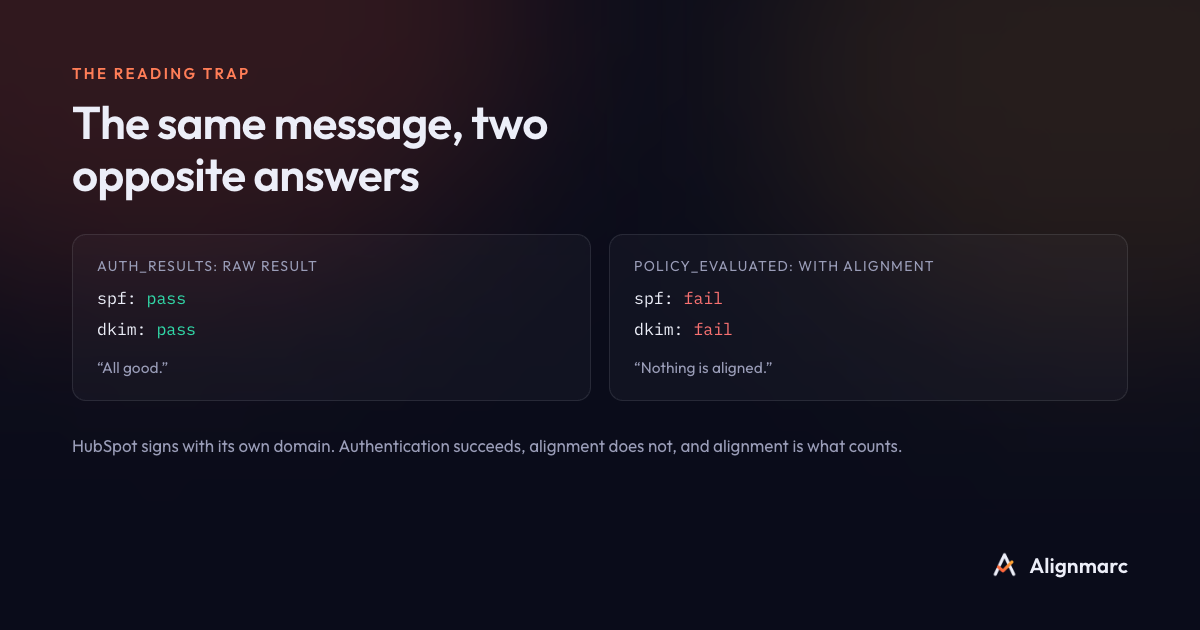
Look closely. In auth_results, DKIM passes and SPF passes. In policy_evaluated, DKIM fails and SPF fails.
That is not a contradiction, and it is the single most important point in this article.
auth_results gives the raw authentication result. HubSpot signed correctly and its SPF is valid. Technically, these messages are authenticated.
policy_evaluated gives the result after the alignment check. And the authenticated domains are hubspotemail.net, while the domain displayed to your customers is company.com. No relation between the two, therefore no alignment, therefore a DMARC failure.
312 messages sent from your CRM are non-compliant, even though the provider made no technical mistake. One piece of configuration is simply missing: having HubSpot sign with DKIM using your domain, which means publishing a few CNAME records on your side. The mechanism is covered in our article on alignment.
The rule to remember: your DMARC compliance rate is calculated on policy_evaluated, never on auth_results. A tool that counts raw results will report 98% compliance where the reality is 74%. The figure will be wrong, and credible enough that you tighten your policy in confidence, right before blocking your own invoices.
The unknown case
<record>
  <row>
    <source_ip>185.220.101.47</source_ip>
    <count>47</count>
    <policy_evaluated>
      <disposition>none</disposition>
      <dkim>fail</dkim>
      <spf>fail</spf>
    </policy_evaluated>
  </row>
  <identifiers>
    <header_from>company.com</header_from>
  </identifiers>
  <auth_results>
    <spf>
      <domain>company.com</domain>
      <result>fail</result>
    </spf>
  </auth_results>
</record>
No DKIM signature at all, SPF failing on the raw result, and an IP address you do not recognize. Forty-seven messages claiming to come from you.
Two hypotheses, and you have to settle them before tightening. Either this is a spoofing attempt, and your policy will block it. Or it is a forgotten legitimate tool (an old website form, a printer sending scans, a provider nobody remembers), and your policy will block that too.
That is exactly why you do not tighten a DMARC policy before identifying every source.
The disposition field, and why it sometimes lies
disposition says what the receiver actually did with the message: none, quarantine or reject.
It does not always match your published policy. A receiver may decide not to apply your policy, because it identified a legitimate forward, for instance, or because it applies rules of its own. In that case the report contains an extra block giving the reason for the override.
So do not panic at seeing disposition set to none while you are on p=reject: it means the receiver judged, that day and for that message, that it was better not to apply your policy.
What an aggregate report will never contain
Three absences, worth knowing so you do not go looking for what is not there.
No recipients. You will never know who the messages were addressed to.
No content. No subject, no body, no attachments.
No attacker identity. You see an IP address, not a person.
That is deliberate. Aggregate reports are designed to describe flows, not people, which makes them usable without raising GDPR difficulties. Failure reports, which did carry headers from real messages, have all but disappeared for that reason: Gmail, Outlook, Yahoo, Apple and LinkedIn do not send them.
From forty reports a day to a single decision
You can now read a report. That leaves the real problem: you receive forty a day, each containing dozens of records, and the useful information is scattered across all of them.
The work consists of summing the count values per source over a rolling window, de-duplicating re-sent reports, translating each IP address into a recognizable provider name, and drawing a single answer out of it: can I tighten, and if not, what is stopping me?
It is doable by hand on one domain, for two weeks. Beyond that it becomes impractical.
Frequently asked questions
How often do DMARC reports arrive? Each receiving organization generally sends one per day per domain. An active domain receives between five and forty daily.
Does a DMARC report contain message content? No. An aggregate report contains no recipients, no subjects and no message bodies, only statistics per sending IP address.
Why do SPF results appear twice in a report?
The policy_evaluated block gives the result after the alignment check; the auth_results block gives the raw result. Only the first determines DMARC compliance.
What does the count field mean?
The number of messages grouped into that record. To get a total volume, sum the count values; do not count the blocks.
Can I read my reports without a tool? On one domain and for a few weeks, yes, with patience and a spreadsheet. Beyond that, volume and de-duplication make the exercise unreliable.
Alignmarc does this work for you: de-duplication, aggregation, senders identified by name, and a clear answer on whether you can tighten. The first domain is free.
Read next